Why Users Don't Understand Your App: What Testers Say
By Luis Krin, Founder, IndieAppCircle
If users don't understand your app, the cause is usually not the design. The first screen never answers one question: what is this for? In 3,177 approved tester reports on IndieAppCircle, labelled by theme (22 October 2026), 11.5% say the tester could not tell what the app does, who it is for, or why they would use it. Among apps with at least three reports, 49% had at least one tester say so.
That is as common as trouble in the first minutes of an app (12.2% mention onboarding), and it gets far less attention. Bugs (25.3%) and "hard to use" (23.8%) are the problems people file and fix. "I don't get it" is quieter. A tester who cannot tell what your app is for does not report a bug. They leave.
This is not a collection of quotes. Tester reports are private to the app owner, and we do not publish them without the tester's consent. What follows is the pattern across about 365 reports, the six forms it takes, and a test you can run on your own first screen this afternoon. The labels were assigned by an AI model reading each report, so treat single percentages as approximate. The method is on the State of Indie App Feedback page.
How common it is, and where
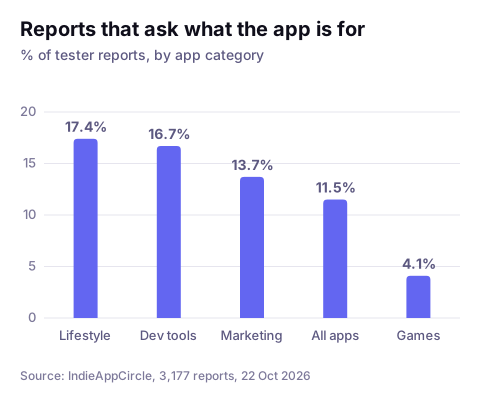
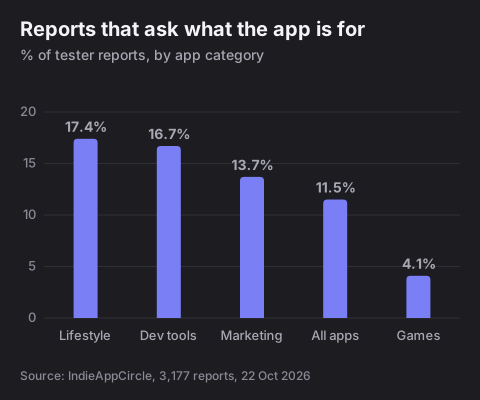
It depends on what you build. Games almost never get this feedback: 4.1% of game reports ask what the game is, because one screenshot of a game shows what it is. Lifestyle apps (17.4%), developer tools (16.7%) and marketing tools (13.7%) get it far more often. These are apps where the value is an outcome you have to imagine: less time, fewer mistakes, a better habit. A stranger has to take your word for it.
Time matters here too. Jakob Nielsen's analysis of Microsoft Research data on more than 200,000 web pages found that visitors often leave within 10 to 20 seconds, and that to earn longer attention you must communicate your value proposition within 10 seconds. That research is about web pages. A stranger who taps your link or opens a downloaded app starts the same clock.
Six ways testers say "I don't get it"
Most of these reports do not say "unclear". They say it sideways, and they say it in one of six ways. I read a sample of the 365 reports to find them. Where a number appears below, it comes from a rough keyword count over all 365, which over- and undercounts. Read it as "a lot", not as a measurement.
1. "I can't tell what it does"
In some reports the main point is a question: what does this do, what is this website about, is it this kind of tool or that one. The tester often used the app anyway and still could not name it afterwards. The usual cause is a headline that names a category ("a platform for teams") or a feeling ("work, simplified") instead of something a person does with the app. If a stranger cannot finish the sentence "it's an app that lets me...", they cannot repeat it to anyone else either.
2. "I get it, but I already have this"
This is the biggest group. About one report in five (81 of 365) compares the app with something the tester already uses: the built-in app on their phone, a larger competitor, a free alternative, or simply asking an AI chatbot. These testers are not confused. Nobody told them what is different, so they filled in the answer themselves, usually "nothing". Your page does not have to claim to be better than everything. It has to name what the visitor would use otherwise, and say what you do that it does not.
3. "Is this for me?"
About one report in six (62) is about audience: testers who say they are not the target user, who find the product too technical for a general user, or who ask who it is meant for. Founders avoid naming an audience because it feels like shutting people out. It does the opposite: a visitor who sees "for freelance designers" and is a freelance designer stays, and one who is not leaves in two seconds instead of spending ten minutes confused.
4. Words only you know
Feature names, internal terms and jargon used as menu labels. Testers ask what a label means, or tell the owner that the headline wording is too complicated. You have used these words every day for months, so they feel like plain language. A good test is whether the word appears in how your user would describe their problem. If it only appears in your code, it is an insider word.
5. The how before the why
Several testers give the same advice in their own words: lead with the problem you solve, and explain how it works later. The product can be impressive, with real engineering behind it, and the page still makes the visitor dig for the benefit. A tester reads the mechanism, nods, and has no idea whether it applies to them. Put the outcome in the first line and the mechanism in the second.
6. "I only got it after I used it"
Some apps are clear after the first result and a blank puzzle before it. The first screen is empty, or it asks for a name, a business goal and a sign-up before it shows anything. Testers in these reports often say the value was obvious once something had happened, and some of them say they nearly left before that. If your value only exists after a result, show a result earlier: a sample output, a pre-filled example, a short demo, or a visible "here is what you will get".
The five-second test
You cannot judge this yourself, because you know what the app is for. You need someone who does not. The test takes ten minutes:
- Pick five people who have never seen the app. Not your co-founder, not a friend who watched you build it. A few people are enough: Nielsen Norman Group's work on testing with five users found that the first handful find most of the problems.
- Show the first screen for five seconds, then hide it. A landing page, a store listing or the first screen of the app, whichever a stranger meets first.
- Ask three questions: what is this? who is it for? what would you press first? Write the answers down word for word.
- Score it. If four of five describe the app in a way you would sign, the screen works. If you get five different answers, you do not have a design problem. You have a sentence problem.
Then change one thing and run it again with five new people. The people from the first round have already learned the answer.
Fix the first screen
These changes answer the six forms above, in the order that usually pays off:
- Write one sentence: who it is for, what they do, what they get. "Test other indie developers' apps, earn credits, and spend them on testers for your own app" is what we say on IndieAppCircle. It names the action and the reward, and it needs no jargon. If your sentence needs a second one to explain the first, rewrite the first.
- Name what people use now. One line, "unlike a spreadsheet" or "instead of asking in a group chat", answers the "I already have this" objection before it forms.
- Say who it is not for. It makes the right visitors surer.
- Outcome first, mechanism second. What changes for the user goes in the headline. How it works goes below it.
- Show a result before you ask for anything. Sign-up, forms and settings can wait until the visitor has seen what they are signing up for.
- Answer the question nobody asks. When I launched IndieAppCircle, new users thought a proper test takes hours. In December 2025 I added a "how long it takes to test" field to listings, to lower that fear. Not every fix is a rewrite. Sometimes it is one line that answers a worry the visitor did not say out loud.
The same sentence belongs in your store listing, in a smaller box. Google Play asks for a short description that conveys your message in 80 characters or less, and Apple's App Store product page guidance gives you a 30-character subtitle and says the first sentence of the description is the most important, because it is the only text people see without tapping "more". If you want a free second opinion on your landing page copy, the Landing Page Roast reads it the way a first-time visitor does. The pre-launch version of this exercise is in the pre-launch checklist, under "one sentence that survives a stranger".
Getting strangers to tell you
The five-second test needs five people with no context. That is the hard part, because everyone you know has context. IndieAppCircle, the site you are reading, is a way to get them. Other developers open your app with no briefing, use it, and write down what they thought it was, in their own words. Sign-up is free and new accounts start with 5 credits. Test 2 apps and yours goes live in the feed. You write a short description and the task you want testers to try, and the reports show you whether their words match yours.
A report is only paid out when you approve it, and one you do not get to is approved automatically after 48 hours. The default reward is 5 credits, the first tester on a new app also gets a 5-credit bonus, and credit packs start at 50 credits for 5€ if you do not want to wait. One limit: most testers here are other makers. They are good at "I don't get it" and "who is this for", and they cannot tell you whether your real customers will understand it. If you sell to dentists, you will also need to put it in front of a dentist.
Frequently asked questions
Why don't users understand my app? Usually the first screen does not say what the app does, who it is for, or why it is better than what they already use. In tester reports on IndieAppCircle, 11.5% say they could not tell, and 49% of apps with three or more reports had at least one tester say so. The design is rarely the cause.
How do I know if my app's purpose is clear? Show the first screen to five people who have never seen it for five seconds, hide it, and ask what it is and who it is for. If four describe it the way you would, it is clear. If you get five different answers, rewrite the headline before you touch the design.
How long should an app's value proposition be? One sentence. Google Play gives you 80 characters for the short description and Apple gives you 30 for the subtitle, so a version that fits in those limits is a good test of whether you know what you are selling.
Is it a design problem or a messaging problem? If testers can use the app but ask what it is for, or why they would use it, it is messaging. If they cannot find things or do not know what a button does, it is design, and our post on UI feedback covers that side.
How many people do I need to test this? Five is enough to see the same confusion repeat. If three of five misread the screen in the same way, you have found the problem. The beta testers guide has the fuller breakdown of how many testers a first round needs.
Should I explain my app to testers before they try it? Not for this test. If you explain it first, you learn nothing about what a stranger would understand. Give them the same first screen a real visitor gets and ask them to describe it in their own words afterwards.
Unclear purpose is one of the themes testers raise most. The others are covered in what they say about onboarding and bugs. If you want strangers to describe your app back to you, you can put it up for testing on IndieAppCircle or look at how to find app testers before launch.