Best App Testing Services for Indie Developers (2026)
By Luis Krin, Founder, IndieAppCircle
Updated
Rules checked against Google's help page on Oct 20, 2026

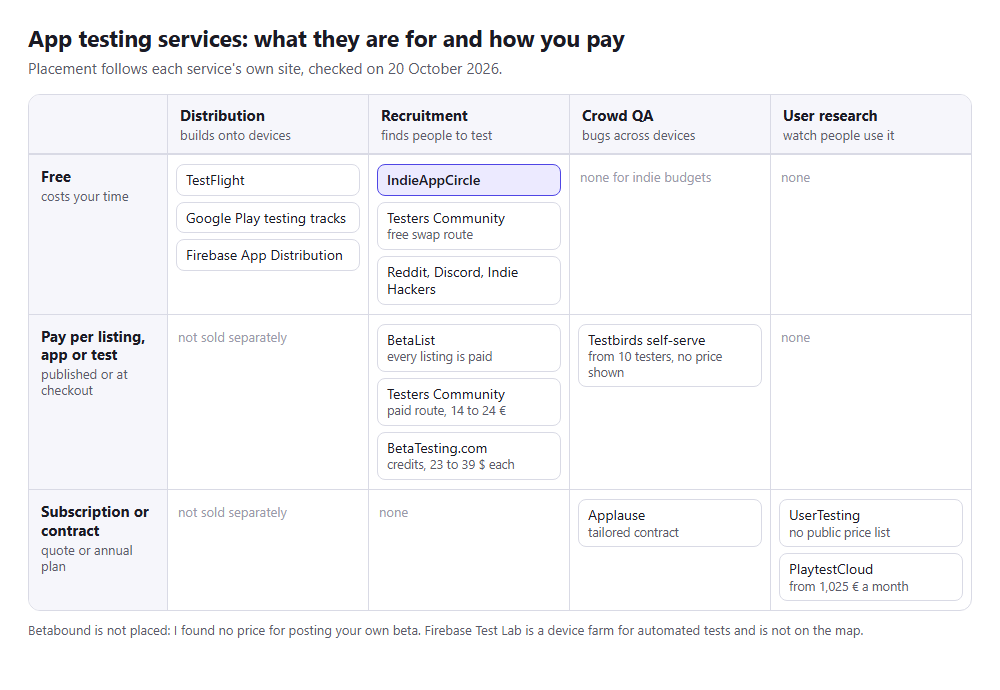
“App testing service” means four different things, and most of the frustration indie developers have with these tools comes from buying one kind when they needed another. Some services distribute your build. Some recruit people to use it. Some sell you professional QA on a hundred devices. Some record strangers thinking aloud while they try your onboarding. Nothing does all four, and the ones that do one thing well are usually free.
This is a comparison of what an indie developer with no budget and no audience can actually use in 2026, sorted by what each service is for. It includes IndieAppCircle, which this site runs, and says where it falls short, because a comparison that only flatters its author is not worth reading.
The four kinds of “testing service”
- Distribution. Gets a build onto a tester’s device. TestFlight, Google Play testing tracks, Firebase App Distribution. Free, essential, and they bring you exactly zero testers.
- Recruitment. Finds people willing to try the app. Testing exchanges, beta directories, communities. This is the part most indie developers are actually looking for when they search “app testing service.”
- Crowd QA. Pays a panel to find bugs across devices and OS versions. Reads like a bug tracker, priced for companies.
- User research. Records people using the app and talking through it. The most insight per session and the most expensive per session.
How I judged them
Three questions for each service. What does it cost a solo developer with no budget? Who actually does the testing? What do you get back? I read each service’s own site on 20 October 2026 for what it sells and what it charges, and I only give a price where the service publishes one. UserTesting, Applause and Testbirds show none, and BetaList shows its prices only at the end of its submission form. Prices change often, so check before you pay.
At a glance
| Service | Kind | Cost | Who tests | What you get back |
|---|---|---|---|---|
| IndieAppCircle | Recruitment | Free (reciprocal), or credits from 5€ | Other indie developers | Written report per test |
| TestFlight / Play tracks / Firebase App Distribution | Distribution | Free | Whoever you bring | Installs; in-app feedback |
| Testers Community | Recruitment (Play only) | Free swap, or 14€ to 24€ per app | Other Android devs, or its paid batch | Opted-in head count |
| BetaList | Recruitment | Every listing is paid | Early adopters | Email sign-ups |
| Betabound | Recruitment | Price for posting not published | Consumer tester community | Managed beta listing |
| BetaTesting.com | Recruitment + QA | Credits, 23 $ to 39 $ each | Screened consumer panel | Surveys, bug reports |
| Testbirds / Applause | Crowd QA | No prices published | Professional crowd | Bug reports by device |
| UserTesting | User research | No public price list | Demographic panel | Recorded sessions |
| PlaytestCloud | User research (games) | From 1,025€ a month, invoiced annually | Gamers | Recorded playtests |
| Reddit / Discord / IH | Recruitment | Free, your time | Whoever replies | Whatever they type |
IndieAppCircle
What it is: an app review exchange between indie developers. You earn credits by installing other people’s apps and writing up what you found; you spend those credits to get your own app tested. Each test comes back as a written report the developer approves (which pays the tester) or rejects with a reason. Unanswered reports approve automatically after 48 hours, so testers get paid whether or not you are at your desk.
What it costs: nothing, if you test first. New accounts start with 5 credits, a test you give earns the reward its owner set (5 credits by default), and your own app goes live once you have submitted two tests. If you would rather not wait, credit packs start at 50 credits for 5€.
Good at: pre-launch feedback from people who build software and know what a useful bug report looks like. Google Play closed tests, because the testers own Android devices and many of them need the same 14 days from you. Costing nothing but an evening of testing. There is a test-for-test mode for a direct one-to-one swap if you would rather pair up than use the credit pool.
What comes back: owners reject one-line feedback, and a rejected test pays nothing. That rule is how quality is kept without paying anyone. Between 31 August and 18 October 2026, 836 reviewed tests were approved and 88 rejected, so about 9 in 10 were approved. A newly listed app waited a median of 6.5 to 10.7 hours for its first test in the three weeks from 28 September. The site had 4,434 members on 19 October 2026.
Not good at: testers who are not developers. If your app is for nurses or parents of toddlers, the people here will find the crash and the confusing button, but they will not tell you whether a nurse would want it. Device coverage is whatever the community happens to own, not a spec sheet you pick from. And buying credits only skips the testing you would otherwise do: the people who test your app are still whoever in the community picks it up, not a panel you chose.
TestFlight, Google Play testing tracks and Firebase App Distribution
What they are: Apple’s and Google’s own beta distribution, plus Firebase’s for both platforms. According to Apple’s TestFlight overview, you can add up to 10,000 external testers by email or public link, a build can be tested for up to 90 days, the first build in an external group may go to App Review, and testers can send feedback with a screenshot from inside the beta app. Google’s help page describes internal testing (up to 100 testers per app, and internal tests might not be subject to standard Play policy or security reviews), closed testing (email lists, Google Groups or a shareable link, and the track that satisfies the 12-testers rule) and open testing (anyone with the link, unlimited by default). Firebase App Distribution invites testers by email on iOS and Android and can collect in-app feedback.
Good at: getting a build onto a phone with no sideloading, updating it, and collecting crash data: with Crashlytics, App Distribution gives you stability metrics per build. It is also listed as “No-cost” on Firebase’s pricing page. You need one of these regardless of what else you use.
Not good at: anything to do with finding testers. A public TestFlight link with nobody looking at it is a link. People search for “TestFlight testers” as if the tool supplies them; it does not, and neither does Play or Firebase. Pair them with a recruitment channel from the rest of this list. If you came looking for a TestFlight alternative because you need people rather than a different installer, the TestFlight public link alternative page covers what to put behind the link.
Testers Community
What it is: a site built around Google Play’s closed-testing requirement. Its free route works like an exchange: you earn credits by testing other developers’ apps, then post yours. It also sells a managed route per app, at 14€ for 15 Android testers (Starter) and 24€ for 25 (Pro), with its own claims of daily use over 16 days and a production access or money-back guarantee. Those are the prices on its site on 20 October 2026.
Good at: the head count. If the only thing standing between you and production access is twelve opted-in testers, this is the narrowest tool for that job.
Not good at: feedback. The free route trades opted-in head count rather than written reports, and the site itself says there is no production access guarantee on it. It is Android only. The paid route raises the question the comparison of bought and real testers covers, because Google prohibits manipulating install counts and its policy page does not say where closed testing falls. The Testers Community alternative page compares the two exchanges directly, and the guide on getting rejected after hitting the count is worth reading before you rely on either.
BetaList
What it is: a directory of pre-launch products. According to its FAQ, “All submissions are paid. There is no free submission option.” Plans differ mainly by how quickly you are featured and whether newsletter inclusion is guaranteed, the prices appear at the end of the submission form, and you are refunded automatically if your startup is not selected. Early adopters who browse the site sign up for your beta by email.
Good at: a burst of sign-ups from people who like being first, and a listing you can link to. Works best for web and SaaS products with a landing page; a mobile app with a TestFlight link converts worse.
Not good at: turning sign-ups into tests. Most people who leave an email never install, and the ones who do are under no obligation to tell you anything. Treat it as a launch-list builder that occasionally produces a tester, not the other way round. If you want the exposure without a listing fee, the BetaList alternative page shows what the exchange offers instead.
Betabound
What it is: a site that lists beta tests, run by Centercode, a beta-test management company. Membership for testers is free, and developers can use its “Submit a Beta Test” link.
Good at: reaching people who like trying consumer products early, if your product is accepted.
Not good at: certainty. I could not find what posting a beta costs or who is accepted, and Centercode’s own business is managed programs with a program manager. Treat Betabound as a question to ask them, not a plan. The Betabound alternative page covers what an indie developer can do without that conversation.
BetaTesting.com
What it is: a paid panel. You describe the testers you want by device, country, and demographics; they recruit from their screened community and run the test with surveys and bug reporting built in.
What it costs: its pricing page lists project credits from 23 $ to 39 $ each depending on volume, with most simple tests starting at 1 credit per tester and tester incentives included. A Teams plan costs 3,588 $ a year and includes 225 credits, and Enterprise starts at 20,000 $ a year. At one credit per tester, my arithmetic puts a 12-tester round at 276 $ to 468 $, and longer or more specific tests cost more.
Good at: testers who match your real audience rather than your peers, and a guaranteed number of them. If you need “twenty iPhone users in the US who have used a budgeting app,” this is the kind of service that can deliver that.
Not good at: being cheap for a side project. The feedback also reads like survey data: consistent, structured, and less opinionated than a developer who found the bug and has a theory about it.
Testbirds, Applause and other crowd QA
What they are: professional crowdtesting. A vetted community of testers is paid per bug or per test cycle to hammer your app on a matrix of real devices, and you get a bug tracker full of reproducible reports. Testbirds sells QA and UX testing, shows no prices, and has a self-serve option for exploratory bug testing that starts at 10 testers and charges nothing until you set the test live. Applause describes itself as managed testing for enterprise clients and says contracts are tailored, with a sales conversation first and no self-serve option shown.
Good at: device and OS coverage, localisation testing, payment flows, and the kind of regression sweep a company runs before a big release.
Not good at: indie questions. They answer “does it work” rather than “does anyone want it.” If you are still finding out whether your onboarding makes sense, this is a stage too late. Testbirds’ self-serve option is the one to price if you need devices you do not own.
UserTesting and PlaytestCloud
What they are: user research. UserTesting records people from a demographic panel using your product and talking through what they are thinking; PlaytestCloud does the same for mobile games, with gameplay video and a survey after.
Good at: the moment you watch someone tap the wrong thing three times and understand exactly why. Nothing else on this list gives you that.
Not good at: price. I found no public UserTesting price list, and it sells through a sales conversation. PlaytestCloud’s published subscriptions start at 1,025€ a month for mobile or PC only (1,130€ for all platforms), invoiced annually, with 120 Video Tokens a year, and a standard playtest costs 1 token per player. It also lists an Indie Pass for studios under 1 million $ in revenue without showing the price, and a free trial of 2 tokens that covers one session with two players. If you are making a game with a budget, that trial is worth using. For anything else, a developer on IndieAppCircle who writes “I tapped Save and nothing happened, then found it in the overflow menu” gets you a lot of the same insight for free.
Reddit, Discord and Indie Hackers
What they are: not services, but where most indie developers actually look first. r/betatests, r/alphaandbetausers and r/TestMyApp exist specifically for this; the subreddit for your app’s audience works better if you are already a member. Indie Hackers rewards “here is what I built and learned” over “please test my app.”
Good at: free, occasionally excellent, and the only way to reach people who are not developers without paying.
Not good at: reliability. One post in one place is a sample size of one, and the feedback is whatever people feel like typing. There is a full guide to getting beta testers for your app that covers how to write the ask so it actually gets replies. For Android closed tests specifically, the guide to Discord, Reddit and Telegram groups shows how to check a group before you post in it.
Device farms and test automation are a different list
Searches for “android app testing services” often land on device farms: services that run automated tests on many real or virtual devices. They check that the app runs, not whether anyone wants it, and they supply no people. Firebase Test Lab is the one an indie developer meets first. Firebase’s pricing page lists no-cost allowances of up to 60 minutes a day on virtual devices and 30 minutes a day on physical devices, then 1 $ and 5 $ per device hour (checked 20 October 2026). Use it when you need to know the app does not crash on a phone you do not own. It will not tell you that your onboarding is confusing.
Which one, for which situation
- “I have a build and no idea if the onboarding makes sense.” A testing exchange plus one post in your audience’s community. Five to eight testers, one task, one week. Free.
- “Google Play will not let me publish.” IndieAppCircle for testers who also write feedback, or Testers Community for head count alone. Read the closed-testing guide first; the 14 days have rules.
- “I need to know it works on devices I do not own.” Ask for device and OS in every report on an exchange, use Firebase Test Lab’s free allowance for crash checks, and if the app makes money already, a paid round on BetaTesting.com or a crowd QA platform for the matrix.
- “I want to watch someone use it.” PlaytestCloud for a game, if you have the budget. For anything else, ask two testers on a call to share their screen; it costs you an hour and nothing else.
- “I want a launch list.” BetaList (every listing is paid) and a Product Hunt “coming soon” page. Those are launch tools that produce the occasional tester, not testing tools.
Frequently asked questions
What is the best free app testing service for indie developers? For feedback, a reciprocal exchange like IndieAppCircle: free, testers are developers, and every test produces a written report. For distribution, TestFlight, Play’s tracks and Firebase App Distribution. Nothing free gives you a demographic panel.
How much do app testing services cost? Free routes cost your time. A paid panel round is a few hundred dollars: BetaTesting.com publishes 23 $ to 39 $ a credit, so 12 testers at one credit each is 276 $ to 468 $. Subscriptions run into the thousands a year: BetaTesting’s Teams plan is 3,588 $ and PlaytestCloud starts at 1,025€ a month. UserTesting and Applause publish no prices.
Are paid app testing services worth it for a side project? Usually not before you have paying users. The paid tools answer questions (device coverage, target demographics, recorded sessions) that matter once the basics are right. Before that, five developers on an exchange will find the same onboarding problems for nothing.
Can I use several at once? You should. Distribution from Apple or Google, recruitment from an exchange and your own community, and a paid round later if the app earns it. They are different layers, not competitors.
How is a testing exchange different from a beta directory? A directory lists your app and hopes. An exchange gives testers a reason to finish: they are paid in credits when you approve their report, and they need those credits for their own app. Completion rates are the whole difference.
Where do I start if I have never done any of this? Put a build on TestFlight or a Play internal track today, then list it for testing with one task and a stated time. You will have your first written report before you have finished reading the pricing pages of the paid options.