Internal vs Closed vs Open Testing on Google Play
By Luis Krin, Founder, IndieAppCircle
Rules checked against Google's help page on Nov 12, 2026
Internal vs closed vs open testing on Google Play comes down to one question: who is the build for? Internal testing is for up to 100 people you name, and a new build reaches them within minutes. Closed testing is for invited testers, and it is the only track that counts toward production access on a new personal account. Open testing is a public beta that anyone can join, and on those accounts it only unlocks after production access. I checked every rule below on Google’s Play Console help pages on 12 November 2026.
I run IndieAppCircle, where developers test each other’s apps, including closed tests, so I have a stake in this. The track rules themselves are Google’s, and I link to them so you can check.
The three tracks at a glance
All numbers are from Google’s page on setting up an open, closed or internal test and its page on testing requirements for new personal accounts.
| Internal | Closed | Open | |
|---|---|---|---|
| Who can join | People you add by email, or with the link | Email lists, Google Groups, or the link | Anyone with the link, and Play search |
| How many | Up to 100 per app | 2,000 per email list, Google Groups unlimited | Unlimited, or a cap of at least 1,000 |
| How fast | Within minutes | Hours for the first link, then review | Hours for the first link, then review |
| Counts for production access | No | Yes, 12+ testers for 14 days | Not available until after it |
| Found in Play search | No | No, testers join with the link | Yes |
| Paid apps | Free for testers | Testers buy the app | Testers buy the app |
On every track, testers cannot leave public reviews on the test version, and their feedback does not change your public rating.
Internal testing: your own devices, in minutes
Internal testing is the fast lane. Google says a new build on the internal track “becomes available to testers within minutes”, and that internal tests “might not be subject to standard Play policy or security reviews.” You add up to 100 testers by email, or share the track’s link with them.
Use it for three things:
- checking that the bundle installs and starts on a real phone, not only the emulator;
- a quick round on your own devices before every closed release;
- giving a teammate or a paid tester a build that is free to install, because internal testers get paid apps for free. In-app purchases still cost money unless you add them as license testers.
What internal testing does not do: count toward production access. Google calls it “optional, but recommended as a starting point.” What to ask Android testers once a build is in their hands is in the guide to testing an Android app before release.
The internal-tester trap
One sentence on Google’s page is easy to miss: “A user who opts into your app’s internal test is no longer eligible to receive an open or closed test.” So if you put the friends you are counting on for your 12 into the internal track first, they get the internal build, not the closed one. Google does not spell out how this affects the 12-tester count, so play it safe. Keep internal for yourself and one or two devices of your own, and send everyone you need for the 12 straight to the closed track’s link.
Closed testing: the track that counts
Closed testing is invitation only. You add testers with email lists (up to 2,000 people each, 50 lists per track) or a Google Group, which has no size limit, and testers join through the track’s opt-in link. Google notes that the first link “can take several hours to become available.” You can run several closed tests at once, next to one open test.
If your developer account is personal and was created after 13 November 2023, this is the track that unlocks everything else. Google requires “a minimum of 12 testers who have been opted in continuously for at least 14 days”, the 14 days have to be consecutive, and production and pre-registration “remain disabled” until you meet it. The full rule, with what “continuously” means for a tester who leaves and comes back, is in the guide to the 12 testers, 14 days requirement.
Two things go wrong here more than anything else. Testers who join and then uninstall in week two, which drops you under 12. And a test that hits the count but shows little real use. Too few opted-in testers and too little engagement are the two reasons Google names when it asks you to keep testing. Recruit 15 to 18 people, not 12, and give them something to do.
Open testing: a public beta, after production access
Open testing is the public beta. Anyone with the link can join, users can find the test through Google Play search, and once the app has a production version they can opt in from your store listing. The tester count is unlimited by default, or you can set a cap, which has to be at least 1,000.
On a new personal account it is not an option before launch. Google’s requirements page says “Open testing becomes available after you gain production access.” So it cannot replace the closed test, and it cannot help you reach the 12. Use it later, for an early access period or a big redesign you want hundreds of people to try before everyone gets it.
Release review vs production access review
These are two different reviews, and guides often mix them up.
- Release review happens to the builds you publish. Closed, open and production releases go through Google’s normal review before testers get them. Internal releases might skip it.
- Production access review happens once, after your closed test. You click Apply for production on the Dashboard and answer questions about your closed test, your app and its readiness. Google says the review usually takes seven days or less. The production access questions guide goes through each prompt.
Which track should you use?
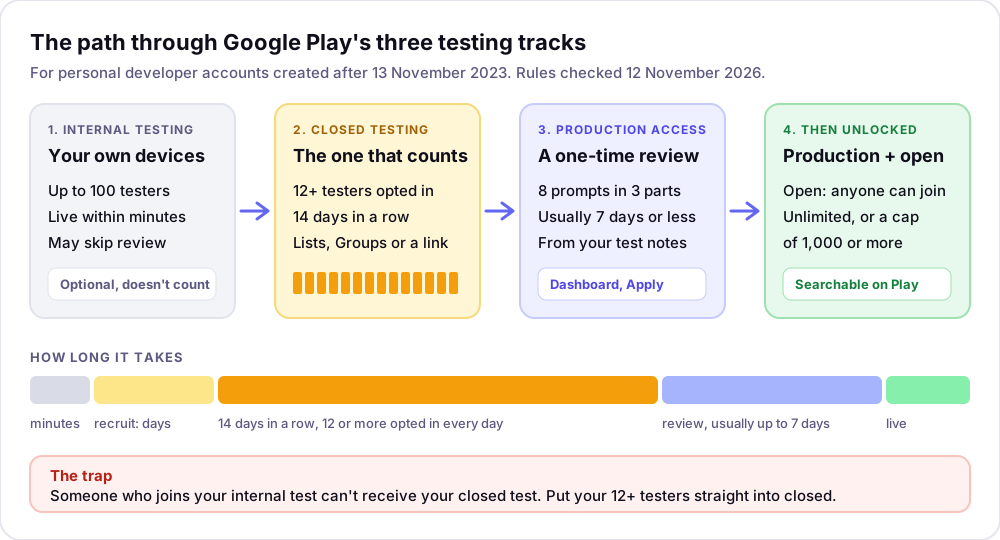
Pick by where you are:
- You just built it. Internal, on your own phone, until it installs and runs without surprises.
- New personal account, you want to launch. Closed, with 15 to 18 testers you ask to stay for two weeks, then apply for production.
- Older personal account or an organization account. The 12-tester rule does not apply. Use closed when you want feedback from people you choose, and open when you want volume.
- You already have production access. Open, when you want a public beta. Keep a closed track for the testers whose feedback you trust most.
How long it takes, start to finish
For a new personal account, budget three to four weeks from a finished build to production:
- minutes for the internal build;
- a few hours for the first closed link, plus release review;
- a few days to recruit, because the clock only counts days with 12 or more opted in;
- 14 consecutive days of closed testing;
- up to about a week of production access review.
The free Closed Test Tracker works out the earliest day you can apply from your start date and tester count, and shows what one drop-out does to the date.
What about iOS?
Apple has the same split inside one tool. In TestFlight, internal testers are up to 100 people on your App Store Connect team, and external testers are up to 10,000 people invited by email or a public link. A build can be tested for 90 days, and the first external build may need App Review. There is no 12-tester rule on iOS: you can submit to the App Store without any beta test at all.
Getting your closed testers here
The hard part of all this is not the Play Console settings. It is finding 12 or more people with Android phones who will keep an unfinished app installed for two weeks and actually open it. On IndieAppCircle, the site you are reading, developers test each other’s apps for credits. New accounts start with 5 credits, a test you give earns the reward its owner set (5 credits by default), and your app goes live once you have submitted two tests. List your closed track’s opt-in link as the app link, tag it Android, ask for the two weeks in the instructions, and set a higher reward to match.
A test only pays when you approve the written report, and one-line reports get rejected, so testers have a reason to open the app. Of the 1,162 tests submitted between 14 September and 1 November 2026, 1,046 were approved and 83 rejected. In 6 of those 7 weeks, the median new app got its first test within a day. My own view, after more than a year of running this: paying testers per test buys quantity, not quality, and a fair exchange beats money. The comparison of bought testers and real ones explains why that matters for production access.
The limits: testers here are developers, not your target users, and IndieAppCircle does not check opt-ins for you. You still count your testers in Play Console. The Google Play testers for closed testing page shows how a closed test runs here, step by step.
Frequently asked questions
Does internal testing count toward the 12 testers? No. Google’s requirement is a closed test with at least 12 testers opted in for 14 consecutive days. Internal testing is optional, and someone who joins your internal test can no longer receive your closed test, so keep the two groups apart.
Can I skip closed testing and go straight to production? Only if your developer account is an organization account, or a personal account created before 13 November 2023. For personal accounts created after that date, production stays disabled until the closed test requirement is met and production access is approved.
How many testers can internal testing have? Up to 100 per app. You add them by email or share the internal track’s link, and new builds reach them within minutes.
Can I use open testing before production access? Not on a personal account created after 13 November 2023. Google says open testing becomes available after you gain production access, so it cannot help you reach the 12 testers.
Can I run internal and closed testing at the same time? Yes. Google lets you run several closed tests and one open test at once, next to internal testing. Just remember that a person opted into internal will not get the closed build.
Can testers leave reviews on a test version? Not public ones. Testers cannot post public reviews on test versions, and their feedback does not affect your public rating. Ask for feedback through a form, an email or a testing platform instead.