Google Play Production Access Questions, Answered
By Luis Krin, Founder, IndieAppCircle
Rules checked against Google's help page on Nov 2, 2026
The Google Play production access questions come in three parts and eight prompts: how your closed test went, who your app is for, and why you think it is ready. You answer them in Play Console once your closed test has run with at least 12 opted-in testers for 14 days, and Google says the review “usually takes seven days or less”. This guide goes through each prompt, what a reviewer can learn from your answer, and what to write down during the test so the answers are easy to write. I checked Google’s help page on 2 November 2026.
I run IndieAppCircle, where developers test each other’s apps, so I have a stake in this. I also cannot tell you what the reviewer weighs. Google does not publish that, and a guide that quotes exact thresholds is guessing. What I can do is show you what the form asks and how to answer from real notes.
What the production access form asks
On Google’s help page, the steps are: open the Dashboard in Play Console, click Apply for production, and “answer the required questions about your closed test, your app, and its production readiness.” The page describes these prompts, in this order:
| Part | Prompt | Type of answer |
|---|---|---|
| 1. Your closed test | How easy it was to recruit testers | Select an option |
| 1. Your closed test | Tester engagement: did testers use all available features, and did usage match expected production users? | Details, in your words |
| 1. Your closed test | Feedback received, and how you collected it | Summary, in your words |
| 2. Your app or game | Target audience, “as specific as possible” | In your words |
| 2. Your app or game | Value proposition (for a game: what makes it unique) | In your words |
| 2. Your app or game | Estimated installs in the first year | Select a range |
| 3. Production readiness | Changes you made because of the closed test | In your words |
| 3. Production readiness | How you decided the app was ready | In your words |
The wording above is mine, based on Google’s description. Some guides list a “how did you recruit testers” question as well. Google’s page does not, so your form may differ from a guide that is older than this one. Read your own form before you write anything. If you have not hit the tester count yet, start with the 12 testers, 14 days guide.
Part 1: about your closed test
How easy it was to recruit testers. Google asks you to select an option, so pick the one that happened. A hard recruit that ended with testers who stayed is a normal story, and the form is not a contest for the easiest one. The rest of Part 1 is where you can show what really happened.
Tester engagement. There are two questions inside this one. Whether testers used all available app features, and whether their usage matched what you expect from production users, “including details on any observed differences”. Answer both from your own notes:
- Name the features testers reached and the ones they did not. “Nobody opened the export screen” is a better answer than “all features were tested”, and it is easy to say if you asked testers to report what they opened.
- Say how your testers differ from real users. If your testers are other developers, they will test more carefully and tap more edge cases than a stranger who found you in a store. Write that. The prompt asks for differences, so a difference is the expected answer, not a confession.
- Use counts you can check. The opted-in count on day 1, 3 and 10, and how many testers sent you a report.
Feedback and how you collected it. Group what testers told you: two or three themes, with how many testers said each. Then one sentence on the method: a form, a shared document, reports on a platform, a group chat. Say which build the feedback was about if it changed during the test.
Part 2: about your app or game
Target audience. Google says “Be as specific as possible.” The difference is easy to see. “Everyone who uses a phone” names nobody. “Freelancers who send 3 to 10 invoices a month and use a spreadsheet today” names a person. Describe the person who would install the app on purpose, then say in one line how your testers compare to them.
Value proposition. One sentence on what changes for the user, then one on how. For an app, Google asks “how your app provides value to users”. For a game, what makes it unique. If a stranger cannot tell what your app is for from your answer, they cannot from your first screen either, which is a common reason for a bounce. I wrote about that in why users do not understand your app.
Estimated installs in the first year. This is a selection, and the help page does not list the ranges or say how Google uses your pick. Choose the range you would defend to a friend, using your real plan: an existing audience, a launch post, a waitlist. I would not round up.
Part 3: production readiness
Changes you made because of the closed test. List the builds you shipped during the 14 days, and for each one the report that caused it. Even a small fix counts: “a tester on Android 11 saw the settings screen cut off, I fixed the layout in build 14”. If you shipped nothing during the test, say what you found and why you decided not to change it. I also suggest shipping at least one update mid-test, because it gives testers a reason to open the app a second time. That part is my advice, not Google’s rule.
How you decided it was ready. Say what you checked and what you accepted. For example: no crashes reported in the last week of the test, the three themes from feedback fixed, and two known issues left, each named, with the reason it does not block a launch. A short list of known problems reads as a developer who ran a real test. A claim that nothing was wrong reads as one who ran a timer.
Keep a log during the 14 days
Most of these answers are easy to write on day 14 only if you wrote the facts down on day 1 to 13. Memory flattens a test into “it went fine”. A small log does not. The figure maps what to note to the prompt it answers.
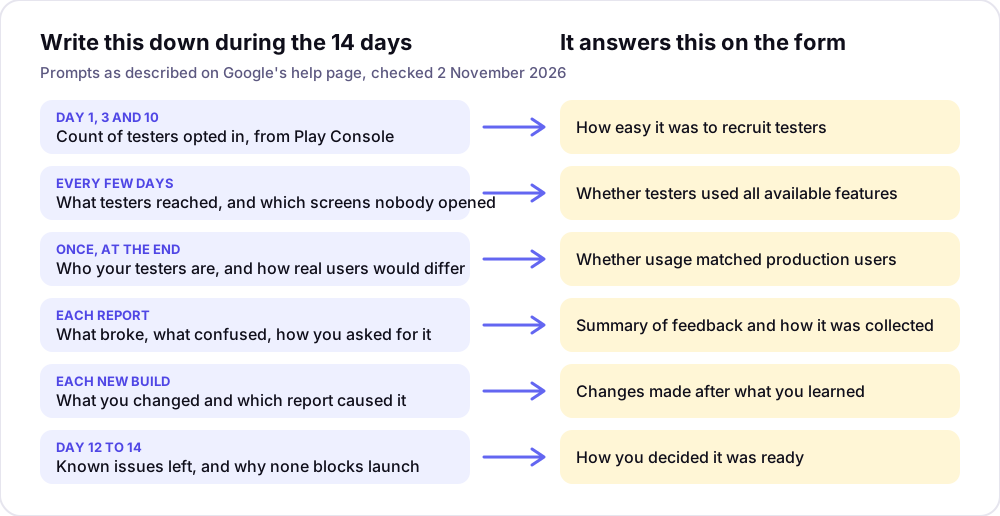
The day-by-day schedule for the opt-in counts is in the closed testing groups guide, and the free Closed Test Tracker counts the 14 days for you.
A skeleton for the engagement answer
Sample answers online are often published by sites that sell testers, and a template cannot know what happened in your test. Here is a skeleton with blanks. Fill every blank from your log, and delete a sentence you cannot fill.
[N] testers stayed opted in for the full 14 days. They reached [features]. Nobody opened [feature], because [reason]. [N] of them sent a written report. Compared with production users, my testers are [who they are], so they [how their usage differs]. I asked for feedback through [method] and shipped build [number] on day [N] to give them a reason to return.
After you click Apply
Google writes that review “usually takes seven days or less, but can occasionally take longer.” If your app needs more testing, the page says “you may need to continue running your closed test”, and gives two reasons: fewer than 12 opted-in testers, or insufficient tester engagement. It does not describe an appeal. Keep your testers opted in while you wait, because the same testers are your cheapest second attempt. If it comes back as more testing, the guide to a rejection after closed testing covers what to change. How testers are added and opt in is on Google’s page on setting up a closed test.
How IndieAppCircle helps you answer
On IndieAppCircle, the site you are reading, developers test each other’s apps for credits, and every test ends in a written report. That gives Part 1 its material: which features testers opened, what broke, and a record of when each report arrived. New accounts start with 5 credits, a test you give earns the reward its owner set (5 credits by default), and your app goes live after you have submitted two tests. List your closed-test opt-in link as the app link, tag it Android and set a higher reward for a two-week commitment.
A test only pays when the owner approves the report, and one-line feedback gets rejected, so the reports tend to say something specific. Unanswered reports approve themselves after 48 hours. Between 31 August and 18 October 2026, 836 reviewed tests were approved and 88 rejected, which is about 9 in 10 approved, and a newly listed app waited a median of 6.5 to 10.7 hours for its first test in the three weeks from 28 September. The site had 4,434 members on 19 October 2026.
The limits: the testers are developers, not your target users, which is something to say honestly in Part 1. IndieAppCircle also does not check opt-ins for you. You still ask for the two weeks and count them yourself. The closed-testing page explains how a closed test runs on IndieAppCircle, and the Android feedback page covers general feedback on an Android app. If you are weighing paid testers, read bought testers versus real ones first.
Frequently asked questions
How many questions are on the Google Play production access form? Google’s help page describes eight prompts in three parts: your closed test, your app or game, and production readiness. Two of them are selections (recruiting ease and the install range) and the rest are written answers. Some older guides list more, so read your own form.
How long does production access review take? Google says it “usually takes seven days or less, but can occasionally take longer.” The page mentions no faster route, so apply when your notes are ready, not on the first possible day.
Can I copy a sample answer? You can read one to see the level of detail, but copying one makes your answer say nothing about your test. Use the skeleton above, fill it from your own log and leave out any sentence you cannot support.
What install range should I pick? Google’s page does not list the ranges or explain how they are used. Pick the one you would defend to a friend, based on the audience you really have, not the one you hope for.
What happens if my production access is not approved? Google says you may need to keep running your closed test, and names fewer than 12 opted-in testers or insufficient engagement as reasons. Keep your testers opted in, add testers if the count dipped, and ship an update so there is something new to use.
Does every developer have to answer these questions? The closed-test requirement applies to personal developer accounts created after 13 November 2023. Older personal accounts and organization accounts are exempt, according to the pages I checked, so confirm yours in Play Console before you plan a two-week test.